
baudolo – Deterministic Backup & Restore for Docker Volumes 📦🔄







baudolo is a backup and restore system for Docker volumes with
mandatory file backups and explicit, deterministic database dumps.
It is designed for environments with many Docker services where:
- file-level backups must always exist
- database dumps must be intentional, predictable, and auditable
✨ Key Features
- 📦 Incremental Docker volume backups using
rsync --link-dest - 🗄 Optional SQL dumps for:
- PostgreSQL
- MariaDB / MySQL
- 🌱 Explicit database definition for SQL backups (no auto-discovery)
- 🧾 Backup integrity stamping via
dirval(Python API) - ⏸ Automatic container stop/start when required for consistency
- 🚫 Whitelisting of containers that do not require stopping
- ♻️ Modular, maintainable Python architecture
🧠 Core Concept (Important!)
baudolo separates file backups from database dumps.
- Docker volumes are always backed up at file level
- SQL dumps are created only for explicitly defined databases
This results in the following behavior:
| Database defined | File backup | SQL dump |
|---|---|---|
| No | ✔ yes | ✘ no |
| Yes | ✔ yes | ✔ yes |
📁 Backup Layout
Backups are stored in a deterministic, fully nested structure:
<backups-dir>/
└── <machine-hash>/
    └── <repo-name>/
        └── <timestamp>/
            └── <volume-name>/
                ├── files/
                └── sql/
                    └── <database>.backup.sql
Meaning of each level
-
<machine-hash>SHA256 hash of/etc/machine-id(host separation) -
<repo-name>Logical backup namespace (project / stack) -
<timestamp>Backup generation (YYYYMMDDHHMMSS) -
<volume-name>Docker volume name -
files/Incremental file backup (rsync) -
sql/Optional SQL dumps (only for defined databases)
🚀 Installation
Local (editable install)
python3 -m venv .venv
source .venv/bin/activate
pip install -e .
🌱 Database Definition (SQL Backup Scope)
How SQL backups are defined
baudolo creates SQL dumps only for databases that are explicitly defined
via configuration (e.g. a databases definition file or seeding step).
If a database is not defined:
- its Docker volume is still backed up (files)
- no SQL dump is created
No database definition → file backup only Database definition present → file backup + SQL dump
Why explicit definition?
baudolo does not inspect running containers to guess databases.
Databases must be explicitly defined to guarantee:
- deterministic backups
- predictable restore behavior
- reproducible environments
- zero accidental production data exposure
Required database metadata
Each database definition provides:
- database instance (container or logical instance)
- database name
- database user
- database password
This information is used by baudolo to execute
pg_dump, pg_dumpall, or mariadb-dump.
💾 Running a Backup
baudolo \
  --compose-dir /srv/docker \
  --databases-csv /etc/baudolo/databases.csv \
  --database-containers central-postgres central-mariadb \
  --images-no-stop-required alpine postgres mariadb mysql \
  --images-no-backup-required redis busybox
Common Backup Flags
| Flag | Description |
|---|---|
--everything |
Always stop containers and re-run rsync |
--dump-only |
Only create SQL dumps, skip file backups |
--shutdown |
Do not restart containers after backup |
--backups-dir |
Backup root directory (default: /Backups) |
--repo-name |
Backup namespace under machine hash |
♻️ Restore Operations
Restore Volume Files
baudolo-restore files \
  my-volume \
  <machine-hash> \
  <version> \
  --backups-dir /Backups \
  --repo-name my-repo
Restore into a different target volume:
baudolo-restore files \
  target-volume \
  <machine-hash> \
  <version> \
  --source-volume source-volume
Restore PostgreSQL
baudolo-restore postgres \
  my-volume \
  <machine-hash> \
  <version> \
  --container postgres \
  --db-name appdb \
  --db-password secret \
  --empty
Restore MariaDB / MySQL
baudolo-restore mariadb \
  my-volume \
  <machine-hash> \
  <version> \
  --container mariadb \
  --db-name shopdb \
  --db-password secret \
  --empty
baudoloautomatically detects whethermariadbormysqlis available inside the container
🔍 Backup Scheme
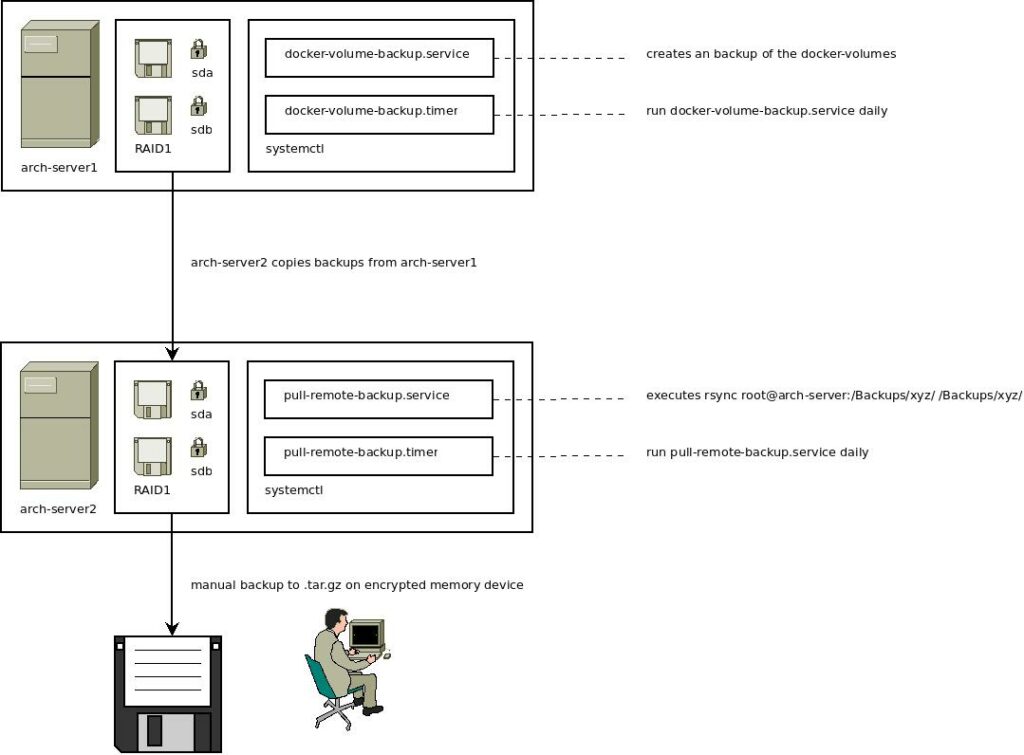
The backup mechanism uses incremental backups with rsync and stamps directories with a unique hash. For more details on the backup scheme, check out this blog post.
👨💻 Author
Kevin Veen-Birkenbach
📜 License
This project is licensed under the GNU Affero General Public License v3.0. See the LICENSE file for details.
🔗 More Information
Happy Backing Up! 🚀🔐