 Kevin Veen-BirkenbachandClaude Opus 5
df1c65ccac
Kevin Veen-BirkenbachandClaude Opus 5
df1c65ccac
Two defaults could not be right. --repo-name fell back to the literal 'backup-docker-to-local' while its help promised the git repo folder name, which nothing ever derived. --databases-csv pointed inside the installed package directory, where credentials must not live; when it applied, load_databases_df read a missing file as empty and the run finished without a single dump and without an error. Both are required now, --repo-name in the restore CLI too. The file itself may still be absent - babadcb's tolerance is untouched, only the path must be named.

--everything is withdrawn. Its one effect was to ignore --images-no-stop-required, which is what leaving that list empty already does, and its branch was the default path minus the requires_stop check. No caller, no test, and help and README described it differently.

--dump-only-sql becomes --only-sql, and --only-files joins it as the opposite half: no dumps at all, every volume as files. They form a mutually exclusive group. A host that only copies files has no business holding database passwords, so --databases-csv is not required there and is never read.

The smallest valid argv turned out to be written four times across the test tree; it now lives once. Withdrawn flags are listed in one place and proven to exit 2.

Co-Authored-By: Claude Opus 5 (1M context) <noreply@anthropic.com>
baudolo – Deterministic Backup & Restore for Docker Volumes 📦🔄







baudolo is a backup and restore system for Docker volumes with
mandatory file backups and explicit, deterministic database dumps.
It is designed for environments with many Docker services where:
- file-level backups must always exist
- database dumps must be intentional, predictable, and auditable
✨ Key Features
- 📦 Incremental Docker volume backups using
rsync --link-dest - 🗄 Optional SQL dumps for:
- PostgreSQL
- MariaDB / MySQL
- 🌱 Explicit database definition for SQL backups (no auto-discovery)
- 🧾 Backup integrity stamping via
dirval(Python API) - ⏸ Automatic container stop/start when required for consistency
- 🚫 Whitelisting of containers that do not require stopping
- ♻️ Modular, maintainable Python architecture
🧠 Core Concept (Important!)
baudolo separates file backups from database dumps.
- Docker volumes are always backed up at file level
- SQL dumps are created only for explicitly defined databases
This results in the following behavior:
| Database defined | File backup | SQL dump |
|---|---|---|
| No | ✔ yes | ✘ no |
| Yes | ✔ yes | ✔ yes |
📁 Backup Layout
Backups are stored in a deterministic, fully nested structure:
<backups-dir>/
└── <machine-hash>/
    └── <repo-name>/
        └── <timestamp>/
            └── <volume-name>/
                ├── files/
                └── sql/
                    └── <database>.backup.sql
Meaning of each level
-
<machine-hash>SHA256 hash of/etc/machine-id(host separation) -
<repo-name>Logical backup namespace (project / stack) -
<timestamp>Backup generation (YYYYMMDDHHMMSS) -
<volume-name>Docker volume name -
files/Incremental file backup (rsync) -
sql/Optional SQL dumps (only for defined databases)
🚀 Installation
Local (editable install)
python3 -m venv .venv
source .venv/bin/activate
pip install -e .
🌱 Database Definition (SQL Backup Scope)
How SQL backups are defined
baudolo creates SQL dumps only for databases that are explicitly defined
via configuration (e.g. a databases definition file or seeding step).
If a database is not defined:
- its Docker volume is still backed up (files)
- no SQL dump is created
No database definition → file backup only Database definition present → file backup + SQL dump
Why explicit definition?
baudolo does not inspect running containers to guess databases.
Databases must be explicitly defined to guarantee:
- deterministic backups
- predictable restore behavior
- reproducible environments
- zero accidental production data exposure
Required database metadata
Each database definition provides:
- database instance (container or logical instance)
- database name
- database user
- database password
This information is used by baudolo to execute
pg_dump, pg_dumpall, or mariadb-dump.
💾 Running a Backup
baudolo \
  --compose-dir /srv/docker \
  --backups-dir /Backups \
  --repo-name my-repo \
  --databases-csv /etc/baudolo/databases.csv \
  --database-containers central-postgres central-mariadb \
  --images-no-stop-required alpine postgres mariadb mysql \
  --images-no-backup-required redis busybox
Common Backup Flags
| Flag | Description |
|---|---|
--only-sql |
Skip file backups only for DB volumes when dumps succeed; non-DB volumes are still backed up; fallback to files if no dump. |
--only-files |
Take no dumps at all; every volume is backed up as files. Needs no --databases-csv. Mutually exclusive with --only-sql. |
--shutdown |
Do not restart containers after backup |
--backups-dir |
Backup root directory (required) |
--repo-name |
Backup namespace under machine hash (required) |
--databases-csv |
Path to databases.csv (required) |
♻️ Restore Operations
Restore Volume Files
baudolo-restore files \
  my-volume \
  <machine-hash> \
  <version> \
  --backups-dir /Backups \
  --repo-name my-repo
Restore into a different target volume:
baudolo-restore files \
  target-volume \
  <machine-hash> \
  <version> \
  --source-volume source-volume
Restore PostgreSQL
baudolo-restore postgres \
  my-volume \
  <machine-hash> \
  <version> \
  --container postgres \
  --db-name appdb \
  --db-password secret \
  --empty
Restore MariaDB / MySQL
baudolo-restore mariadb \
  my-volume \
  <machine-hash> \
  <version> \
  --container mariadb \
  --db-name shopdb \
  --db-password secret \
  --empty
baudoloautomatically detects whethermariadbormysqlis available inside the container
🔍 Backup Scheme
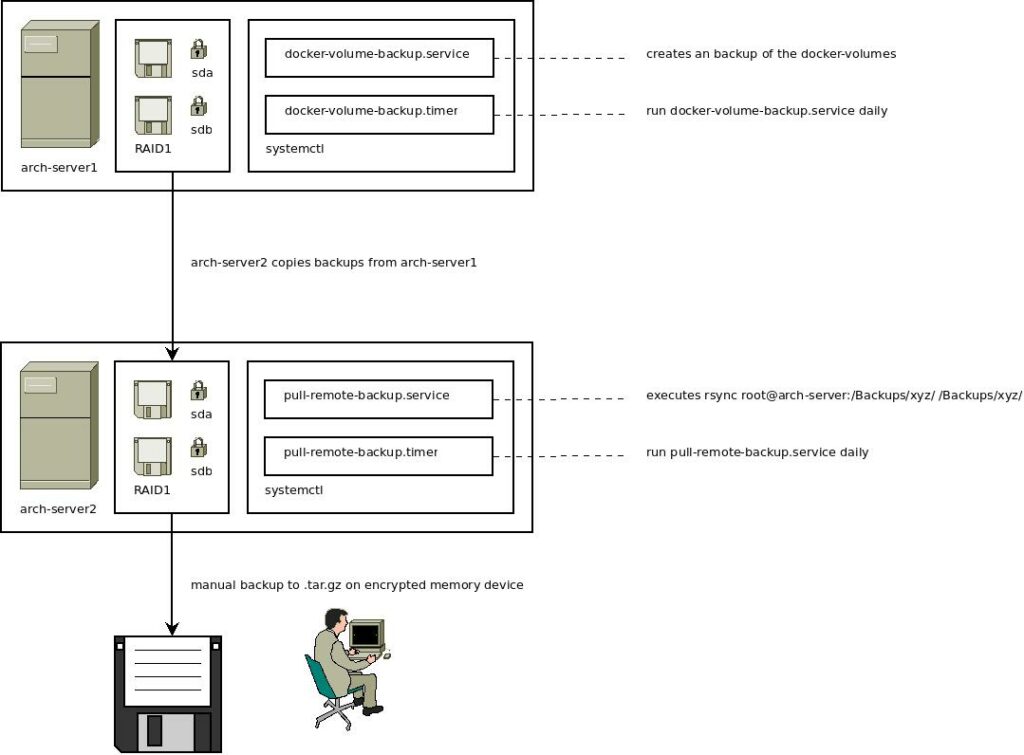
The backup mechanism uses incremental backups with rsync and stamps directories with a unique hash. For more details on the backup scheme, check out this blog post.
👨💻 Author
Kevin Veen-Birkenbach
📜 License
This project is licensed under the GNU Affero General Public License v3.0. See the LICENSE file for details.
🔗 More Information
Happy Backing Up! 🚀🔐